Game Pixel Blue Glow: A Dynamic Vector Text Effect
That moment when a design needs to feel like it's alive, buzzing with energy and a distinct digital pulse, is when a standard font just won't cut it. You're crafting a logo for an indie game studio, designing a stream overlay, or creating social media posts for a tech launch, and the typography needs to do more than just spell out words—it needs to evoke an atmosphere. The Game Pixel Blue Glow Text Effect is precisely the kind of asset that answers that call, offering a ready-made, high-energy aesthetic that’s both specific and surprisingly versatile for creators working in Adobe Illustrator.
Capturing the Retro-Futuristic Vibe
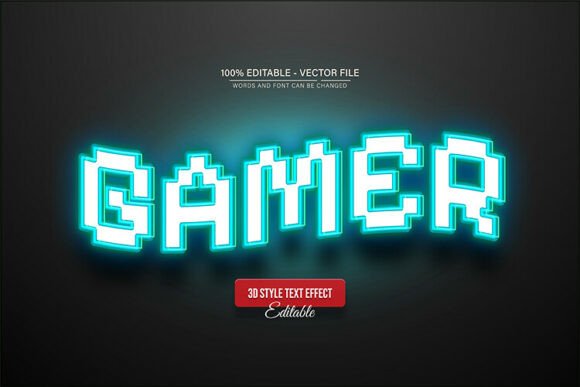
At its core, this design asset merges the nostalgic charm of pixel art with a modern, luminous finish. The visual appeal is immediate: crisp, blocky letterforms are outlined with a vibrant blue glow, reminiscent of classic arcade cabinets, neon signs, and the UI of countless video games. It’s a style that instantly communicates themes of technology, gaming, entertainment, and cutting-edge digital culture. What makes it particularly useful is that it’s not just a static image. Delivered as a fully editable vector in both EPS and JPG formats, it transforms from a fixed effect into a flexible design tool.
Imagine you're working on branding for a new podcast about retro tech. The pixelated structure of the text nods to the past, while the glowing blue effect feels fresh and contemporary, perfectly bridging the two eras. For a content creator, using this effect on a YouTube thumbnail for a gaming review can make the title pop off the screen, dramatically increasing click-through potential. The visual consistency it offers is a major advantage; once you establish your brand's title using this effect, that recognizable, glowing aesthetic can be carried across your website header, merchandise, and all social media graphics, strengthening brand recognition with every use.
Practical Applications Across Creative Projects
The true value of a design asset like this lies in its adaptability. While its personality is bold and thematic, its applications span a wide range of creative and commercial projects. As a logo design element, it provides an instant identity for businesses in the gaming, software, or esports industries. For packaging design, especially for products like energy drinks, tech accessories, or themed subscription boxes, this text effect can create a shelf presence that feels dynamic and appealing to a target audience that values modern aesthetics.
Beyond the digital realm, consider its use in print materials. A poster for a gaming tournament or a local arcade night would benefit immensely from this typography, capturing attention from a distance. For entrepreneurs creating digital products—like planners, stickers, or social media template packs—incorporating this effect can add a premium, professional touch that justifies a higher value point. Even in editorial design, a magazine feature on the future of VR or an article about e-sports could use this for pull quotes or section headers to inject visual energy and break up long blocks of text.
Working with the Vector: Editability and Control
The claim of being "100% editable" is where this asset truly earns its place in a designer's toolkit. Because it's a vector, you are not just stuck with the words provided. You can change the text, adjust the scale without any loss of quality, and—most powerfully—alter the color palette to match any brand identity. The blue glow is iconic, but what if your brand's primary color is a vibrant green or a deep magenta? In Adobe Illustrator, you can easily recolor the glow, the text fill, or the outlines to create unlimited variations, making the asset truly your own.
This editability also directly impacts professional presentation and audience engagement. A mismatched font can make a design look amateurish, but a customized, thematic effect shows attention to detail. The process is straightforward: open the file in Adobe Illustrator CS or higher, select the Type Tool (T), click on the existing text, and type your own words. The effect is applied to the new text instantly. This ease of use means even those with intermediate design skills can produce sophisticated results quickly, which is invaluable for small business owners juggling multiple roles.
Smart Integration: Pairing and Readability
While the Game Pixel Blue Glow effect is a showstopper, it's rarely used for entire paragraphs of body copy. Its strength is in headlines, logos, and short, impactful phrases. This is where understanding font pairing becomes essential. For a balanced and readable design, pair this bold display typeface with a clean, neutral sans serif font for longer text. A simple, geometric sans serif can provide a quiet, stable counterpart that doesn't compete for attention, ensuring your overall message remains clear and legible.
Always test your pairings in context. Place your glowing headline and your chosen body text on a mockup of your final product—be it a website hero banner or a physical product label. Check the contrast, the spacing, and the overall hierarchy. Does the glow overwhelm the supporting text? Is the headline still readable at the intended size? The vector format allows you to experiment freely with these questions, adjusting scale and color until the composition feels just right. Remember, the goal is to use this creative font to enhance engagement, not to obscure your message.
Before downloading any commercial font or design asset, a final practical step is to review the included license. Ensuring the asset is cleared for your intended use—whether for a client project, a personal blog, or merchandise for sale—is non-negotiable for professional work. This particular asset comes with the font information for free fonts used in the preview, simplifying the process of achieving the exact look. By leveraging a tool like the Game Pixel Blue Glow Text Effect thoughtfully, you're not just decorating a project; you're strategically employing modern typography to build a memorable and effective visual communication system.